






CBSE Board Result 2026: Comprehensive Guide to DigiLocker Account Activation
The Central Board of Secondary Education (CBSE) has taken a significant step toward digitizing the academic journey of millions of students. For the CBSE Board Result 2026, the board has officially activated the DigiLocker account confirmation portal. This initiative is designed to provide Class 10th and 12th students with a secure, paperless, and instantaneous method to access their academic records. With over 44 lakh students appearing for the exams in 2026, the traditional results website often faces technical glitches due to high traffic. DigiLocker serves as a robust alternative that ensures every student gets their results without any delay.
As of April 15, 2026, the evaluation process is in its final stages. To streamline the result distribution, CBSE has already issued unique 6-digit security PINs to all affiliated schools across India and abroad. Students must understand that activating their DigiLocker account is not just an option but a recommended necessity for modern-day documentation. This guide provides an in-depth look at why DigiLocker is essential and how you can prepare your account before the result announcement.
Why DigiLocker is Mandatory for CBSE 2026 Results
DigiLocker is a flagship initiative of the Ministry of Electronics & IT (MeitY) under the Digital India corporation. For CBSE students, it acts as a digital locker where all academic certificates—ranging from marksheets to migration certificates—are stored permanently. There are several reasons why students should prioritize this activation:
- Instant Access: No more waiting for hours on a crashing website. Digital documents are pushed to your account the moment results are declared.
- Legal Validity: Under the Information Technology Act, 2000, digital documents in DigiLocker are at par with original physical certificates.
- Security: The 6-digit PIN ensures that only the rightful student can access their sensitive academic data.
- APAAR ID Integration: For 2026, CBSE has integrated the Automated Permanent Academic Account Registry (APAAR) ID, which creates a lifelong academic credit bank for students.
Important Official Links for CBSE Students
| Resource Name | Official Direct Link |
|---|---|
| DigiLocker Account Confirmation | Click Here to Activate |
| CBSE Results Portal | results.cbse.nic.in |
| CBSE Official Website | cbse.gov.in |
| DigiLocker Main Portal | digilocker.gov.in |
Understanding the 6-Digit Security PIN
To maintain the highest level of privacy, CBSE does not allow public access to results via DigiLocker without a specific PIN. This PIN is a unique code generated for every individual student. Schools play a crucial role here as they are responsible for downloading the PIN files from the CBSE portal and distributing them to their respective students.
If you are a student, you must contact your Class Teacher or the School Office to collect your 6-digit security PIN. Without this PIN, the “Account Confirmation” process cannot be completed. The board has strictly instructed schools to share these PINs only with the concerned students or their parents to prevent any misuse of data.
Step-by-Step Activation Process for Class 10th & 12th
Activating your account is a simple 5-minute process. Follow these instructions carefully:
- Visit the Portal: Navigate to the dedicated CBSE DigiLocker page at
cbseservices.digilocker.gov.in/activatecbse. - Select Your Class: On the landing page, choose whether you belong to Class X or Class XII.
- Enter Identification Details: You will be prompted to enter your School Code (as per your Admit Card) and your Board Roll Number.
- Input the Security PIN: Carefully type the 6-digit security PIN provided by your school. Ensure there are no typos.
- Mobile Verification: Enter a valid mobile number. It is recommended to use the number that was registered with the school during the examination form filling. You will receive a One-Time Password (OTP).
- Confirm OTP: Enter the OTP received on your phone and click on “Submit”.
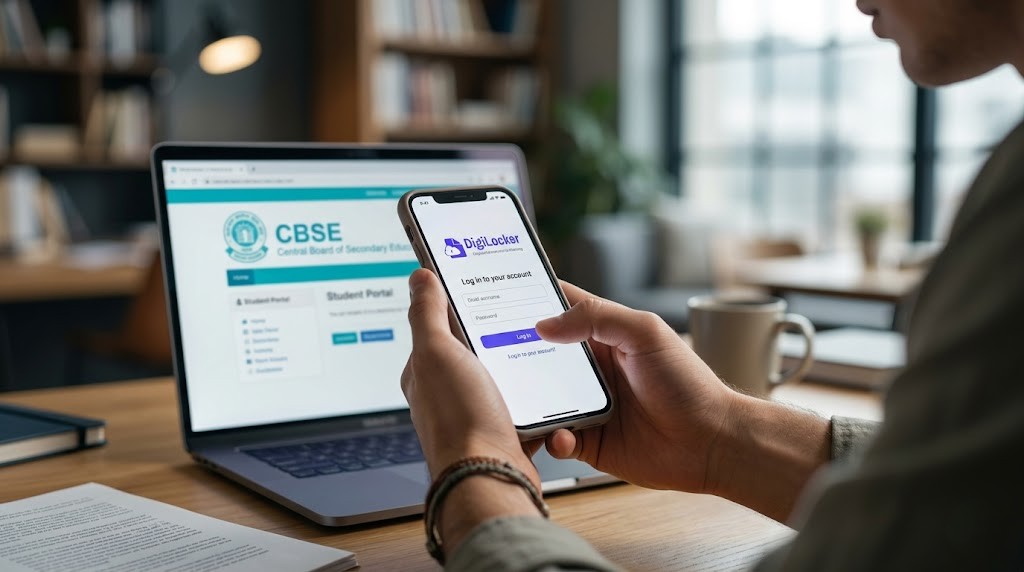
- Final Confirmation: Your account is now confirmed. You can now download the DigiLocker app on your smartphone and log in using your Aadhar number or mobile number.
What to do if You Face Issues During Activation?
While the portal is designed to be user-friendly, students sometimes encounter errors. Here are solutions to common problems:
- PIN Mismatch: Double-check the PIN with your school. Sometimes, a zero (0) might be mistaken for an ‘O’. Ensure you are entering digits only.
- School Code Error: Refer to your 2026 Admit Card for the correct 5-digit or 6-digit school code. Do not use the school’s general registration number.
- OTP Not Received: Ensure your mobile network is strong. If the delay persists, try using a different mobile number or wait for 15 minutes before re-requesting the OTP.
- “Record Not Found”: This happens if the data hasn’t been synced yet. Wait for 24 hours and try again, or check if you entered your Roll Number correctly.
The Role of APAAR ID in CBSE 2026
The Government of India has introduced the “One Nation, One Student ID” or APAAR ID. Starting with the 2026 results, CBSE is increasingly linking DigiLocker accounts with APAAR IDs. This ID will track your academic progress from Class 1 to Ph.D. level. By activating your DigiLocker now, you are also facilitating the seamless creation of your APAAR profile, which will be essential for college admissions and scholarship applications in the future.
Safety and Privacy Features of DigiLocker
Many parents express concerns about the safety of digital documents. It is important to note that DigiLocker uses the same level of security as banking systems. The platform is encrypted, and access is protected by multi-factor authentication (Aadhar-linked mobile OTP and Security PIN). Your documents are stored in the government’s secure cloud servers, ensuring they cannot be tampered with or accessed by unauthorized third parties.
Conclusion
In conclusion, the CBSE Board Result 2026 DigiLocker activation is a vital milestone for every student. By following the steps outlined above, you can ensure that your academic certificates are ready for download the moment the result link is active. Do not wait for the final day, as server congestion can make the process difficult. Contact your school today, get your security PIN, and embrace the digital future of education. For all the latest news on CBSE result dates and toppers’ lists, keep visiting sahiupdate.com. We wish all the Class 10 and 12 students the very best for their results!


Leave a Comment